Excel Shortcuts Cheat Sheet

F Keys

F1 Displays the Office Assistant or (Help >Microsoft Excel Help)
F2 Edits the active cell, putting the cursor at the end
F3 Displays the (Insert > Name > Paste) dialog box
F4 Repeats the last worksheet action (Edit > Repeat)
F5 Displays the (Edit > GoTo) dialog box
F6 Moves to the next pane in a workbook (if the window is split)
F7 Displays the (Tools > Spelling) dialog box
F8 Toggles whether to extend a selection with the arrow keys
F9 Calculates All the worksheets in All the open workbooks
F10 Toggles the activation of the Menu Bar
F11 Displays the (Insert > Chart) dialog box that creates a chart (on a chart sheet) using the highlighted range
F12 Displays the (File > Save As) dialog box
Shift + F2 Inserts or edits a cell comment (Insert > Comment)
Shift + F3 Displays the (Insert > Function) dialog box
Shift + F4 Repeats the last Find, the same as (Edit > Find Next)
Shift + F5 Displays the (Edit > Find) dialog box
Shift + F6 Moves to the previous pane in a workbook (if the window is split)
Shift + F8 Toggles between switching Add Mode on or off*
Shift + F9 Calculates just the active worksheet
Shift + F10 Displays the (Shortcut) menu for the selected item
Shift + F11 Inserts a new worksheet (before the active sheet) into the active workbook (Insert > Worksheet)
Shift + F12 Saves, Displays the (File > Save As) dialog box if a new workbook
Ctrl + F1 Closes and reopens the current task pane (ribbon in 2007)
Ctrl + F2 Print Preview
Ctrl + F3 Displays the (Insert > Name > Define) dialog box
Ctrl + F4 Closes the selected workbook window
Ctrl + F5 Restores the size of the active workbook or window
Ctrl + F6 Moves to the next open workbook or window
Ctrl + F7 Activates the Move window command
Ctrl + F8 Activates the Resize window command
Ctrl + F9 Minimises the size of the active workbook or window
Ctrl + F10 Maximises the size of the active workbook or window
Ctrl + F12 Displays the (File > Open) dialog box
Alt + F1 Creates a chart (on a chart sheet) using the highlighted range
Alt + F2 Displays the (File > Save As) dialog box
Alt + F4 Closes all the workbooks (saving first) and exits Excel (File > Exit)
Alt + F8 Displays the (Tools > Macro > Macros) dialog box
Alt + F11 Toggles between the Visual Basic Editor window and and the Excel window
Alt + Ctrl + F9 Calculates All cells on All worksheets in All workbooks
Alt + Shift + F1 Inserts a new worksheet (before the active sheet) into the active workbook (Insert > Worksheet)
Alt + Shift + F2 Displays the (File > Save As) dialog box
Alt + Shift + F4 Closes all the workbooks (saving first) and exits Excel (File > Exit)
Alt + Shift + F10 Displays the drop-down menu for the corresponding smart tag
Alt + Shift + F11 Activates the Microsoft Script Editor window
Ctrl + Shift + F3 Displays the (Insert > Name > Create) dialog box
Ctrl + Shift + F6 Moves to the previous open workbook or window
Ctrl + Shift + F10 Activates the Menu Bar or Shortcut Characters in 2007
Ctrl + Shift + F12 Displays the (File > Print) dialog box

Ctrl Keys

Ctrl + 0 Hides the columns in the current selection
Ctrl + 1 Displays the formatting dialog box
Ctrl + 2 Toggles bold on the current selection
Ctrl + 3 Toggles italics on the current selection
Ctrl + 4 Toggles underlining on the current selection
Ctrl + 5 Toggles the strikethrough of text on the current selection
Ctrl + 6 Toggles between hiding, displaying
Ctrl + 8 Toggles the display of Outline symbols on the active worksheet
Ctrl + 9 Hides the rows in the current selection (Format > Row > Hide)
Ctrl + Shift + 0 Unhides the columns in the current selection
Ctrl + Shift + 2 Enters the value from the cell directly above into the active cell
Ctrl + Shift + 8 Selects the current region (surrounded by blank rows and columns)
Ctrl + Shift + 9 Unhides the rows in the current selection
Ctrl + A Displays formula palette given a function name or selects the whole worksheet or current date
Ctrl + B Toggles bold on the current selection
Ctrl + C Copies the current selection to the clipboard
Ctrl + D Copies the first cell in the selection downwards
Ctrl + E Flash Fill
Ctrl + F Displays the Find dialog box
Ctrl + G Displays the GoTo dialog box
Ctrl + H Displays the Replace dialog box
Ctrl + I Toggles italics on the current selection
Ctrl + K Displays the Insert Hyperlink dialog box
Ctrl + L Displays the Create Table dialog box
Ctrl + N Creates a new workbook
Ctrl + O Displays the Open dialog box
Ctrl + P Displays the Print dialog box
Ctrl + R Copies the leftmost cell in the selection to the right
Ctrl + S Saves, Displays the Save As dialog box if a new workbook
Ctrl + T Create table
Ctrl + U Toggles underlining on the current selection
Ctrl + V Pastes the entry from the clipboard
Ctrl + W Closes the active workbook or window
Ctrl + X Cuts the current selection to the clipboard
Ctrl + Y Repeats the last workbook action
Ctrl + Z Undo the last workbook action
Ctrl + Shift + F Activates the Font Tab of the format cells
Ctrl + Shift + O Selects all the cells with comments
Ctrl + Shift + P Activates the Font Size tab of the format cells

Enter Tab Alt Keys

Enter Enters the contents of the active cell and moves to the cell below (by default)
Shift + Enter Enters the contents of the active cell and moves to the cell above (by default)
Tab Enters the contents of the active cell and moves one cell to the right
Shift + Tab Enters the contents of the active cell and moves one cell to the left
Alt + = Enters the SUM() function (AutoSum) to sum the adjacent block of cells
Alt + 0128 Enters the euro symbol (€) (using Number keypad)
Alt + 0162 Enters the cent symbol (¢) (using Number keypad)
Alt + 0163 Enters the pound sign symbol (£) (using Number keypad)
Alt + Enter Enters a new line (or carriage return) into a cell
Ctrl + ‘ Enters the contents from the cell directly above into the active cell
Ctrl + Shift + 2 Enters the value from the cell directly above into the active cell
Ctrl + ; Enters the current date into the active cell
Ctrl + Shift + ; Enters the current time into the active cell
Ctrl + Shift + Enter Enters the formula as an Array Formula
Shift + Insert Enters the data from the clipboard
Alt + Down Arrow Displays the Pick From List drop-down list Esc Cancels the cell entry and restores the original contents
Alt

Delete Backspace Keys

Delete Deletes the selection or one character to the right
Backspace Deletes the selection or one character to the left
Shift + Delete Cuts the selection to the clipboard
Ctrl + Delete Deletes text to the end of the line
Ctrl + – Displays the Delete dialog box
Ctrl + Shift + = Displays the Cells dialog box

Selection Keys

Ctrl + \ Selects the cells in a selected row that do not match the value in the active cell
Ctrl + Shift + \ Selects the cells in a selected column that do not match the value in the active cell
Ctrl + / Selects the array containing the active cell ??
Alt + ; Selects the visible cells in the current selection
Ctrl + Shift + (8 or *) Selects the current region (surrounded by blank rows and columns)
Ctrl + * Selects the current region (using the * on the number keyboard)
Ctrl + [ Selects all the cells that are directly referred to by the formula in the active cell (precedents)
Ctrl + Shift + [ Selects all the cells that are directly (or indirectly) referred to by the formula in the active cell
Ctrl + ] Selects all the cells that directly refer to the active cell (dependents)
Ctrl + Shift + ] Selects all the cells that directly (or indirectly) refer to the active cell
Ctrl + Shift + Page Down Selects the active worksheet and the one after it
Ctrl + Shift + Page Up Selects the active worksheet and the one before it
Ctrl + Shift + Spacebar Selects all the objects on the worksheet when an object is selected or selects the whole worksheet
Ctrl + Spacebar Selects the current column
Shift + Arrow keys Selects the active cell and the cell in the given direction
Shift + Backspace Selects the active cell when multiple cells are selected
Shift + Spacebar Selects the current row
Ctrl + Shift + Arrow Key Extends the selection to the next cell adjacent to a blank cell in that direction
Ctrl + Shift + End Extends the selection to the last used cell on the worksheet
Ctrl + Shift + Home Extends the selection to the beginning of the worksheet
Shift + Arrow Keys Extends the selection by one cell in that direction
Shift + Home Extends the selection to the first column
Shift + Page Down Extends the selection down one screen
Shift + Page Up Extends the selection up one screen
End + Shift + Arrow Keys Extends the selection to the next non-blank cell in that direction
End + Shift + End Extends the selection to the last cell in the current row*
End + Shift + Home Extends the selection to last used cell on the worksheet
Alt + ‘ Displays the Style dialog box
Ctrl + Shift + ( ‘ or ) Applies the Time format “hh:mm” to the selection
Ctrl + Shift + (1 or !) Applies the Comma separated format “#,##0.00” to the selection
Ctrl + Shift + (4 or $) Applies the Currency format “£#,##0.00” to the selection
Ctrl + Shift + (5 or %) Applies the Percentage format “0%” to the selection
Ctrl + Shift + (6 or ^) Applies the Exponential format “#,##E+02” to the selection
Ctrl + Shift + (# or ~) Applies the General format to the selection
Ctrl + (# or ~) Applies the Custom Date format “dd-mmm-yy” to the selection
Ctrl + Shift + (7 or &) Applies the outline border to the selection
Ctrl + Shift + (- or _ ) Removes all the borders from the selection

Movement Keys

Arrow Keys Moves to the next cell in that direction
Ctrl + Tab Moves to the next open workbook or window
Alt + Tab Moves to the next application open on your computer
Alt + Shift + Tab Moves to the previous application open on your computer
Enter Moves to the cell directly below
Tab Moves to the next cell on the right (or unprotected cell)
Home Moves to the first column in the current row
End + Arrow Keys Moves to the next non empty cell in that direction
End + Enter Moves to the last cell in the current row that is not blank
End + Home Moves to the last used cell on the active worksheet*
Page Down Moves to the next screen of rows down
Page Up Moves to the previous screen of rows up
Shift + Enter Moves to the cell directly above (opposite direction to Enter)
Shift + Tab Moves to the cell directly to the left (opposite direction to Tab)
Alt + Page Down Moves you one screen of columns to the right
Alt + Page Up Moves you one screen of columns to the left
Ctrl + Home Moves to cell “A1” on the active sheet
Ctrl + End Moves to the last used cell on the active worksheet*
Ctrl + Up Arrow Moves to the first row in the current region
Ctrl + Down Arrow Moves to the last row in the current region
Ctrl + Left Arrow Moves to the first column in the current region
Ctrl + Right Arrow Moves to the last column in the current region
Ctrl + Page Up Moves to the previous worksheet in the workbook
Ctrl + Page Down Moves to the next worksheet in the workbook
Ctrl + Shift + Tab Moves to the previous open workbook or window
Scroll Lock + Arrow Keys Moves the workbook or window one cell the corresponding direction
Scroll Lock + End Moves to the last cell in the current window
Scroll Lock + Home Moves to the first cell in the current window
Scroll Lock + Page Down Moves you down one screen (current selection unchanged
Scroll Lock + Page Up Moves you up one screen (current selection unchanged)
Enter Moves from top to bottom within a selection
Tab Moves from left to right within a selection
Ctrl + . Moves clockwise to the next corner within a selection
Shift + Tab Moves from right to left within a selection (opposite direction to Tab)
Alt + Ctrl + Left Arrow Moves to the left between non adjacent cells in a selection
Alt + Ctrl + Right Arrow Moves to the right between non adjacent cells in a selection
= Starts a Formula
Ctrl + ` Toggles between the value layer and the formula layer
Ctrl + Insert Copies the current selection to the clipboard
Ctrl + Shift + ( Unhides any hidden rows within the selection
Ctrl + Shift + ) Unhides any hidden columns within the selection
Ctrl + Shift + \ Select unequal cells

Windows Tips

Web to install software

Install and Update All Your Programs at Once
No toolbars. No clicking next. Just pick your apps and go.
Ninite.com

New folder for settings

New folder in desktop with all settings, creating a shorcut in desktop
GodMode.{ED7BA470-8E54-465E-825C-99712043E01C}

Memory diagnosis

mdsched.exe

Show Wifi Profiles and Passwords

netstat wlan show profile
netstat wlan show profile name="nombre" key=clear

Clear DNS client cache

Clear-DnsClientCache

Check App errors , system updates

Reliability Monitor

Check performance

Performance Monitor

Passwordless start

HKEY_LOCAL_MACHINE\SOFTWARE\Microsoft\WindowsNT\CurrentVersion\PasswordLess\Device
2 to 0
netplwiz Deselect users must enter a …

Disallow Telemetry

HKEY_LOCAL_MACHINE\SOFTWARE\Policies\Microsoft\Windows\DataCollection
0 DWord32 AllowTelemetry
Task Scheduler
Task Scheduler Library/Microsoft/Windows/Application Experience Disable
Task Scheduler Library/Microsoft/Windows/Customer Experience Improvement Program Disable
service dmwappushservice Disable

Some Windows Keyboard Shortcuts

Shift+Ctrl+Win+b Reset graphic driver
Win Search Apps
Win+z Select layout with number
Win+r Open
Ctrl + A Select all items in a window
Ctrl + Z Undo
Ctrl + Y Redo
Ctrl + N When File Explorer is your current window, open a new File Explorer window with the same folder path as the current window
Alt + F4 Close app or windows
Shift+Shutdownr Total Shutdown
Win+Alt+R Record screen
Win+G Access recordings
Win+ Shift+S Partial screen photo Snipping tool
Win+X u u Shutdown
Win+V Access clipboard history
Win+D Hide apps and go to desktop
Win+, Quick view of desktop
Win+I Open settings
Win+H Dictation tool
Win+C Copilot

Imagenio list of RTP channels

#EXTINF:-1,[000] Canal Promocional
rtp://@239.0.0.77:8208
#EXTINF:-1,[001] Tve
rtp://@239.0.0.76:8208
#EXTINF:-1,[002] La 2
rtp://@239.0.0.2:8208
#EXTINF:-1,[003] Antena 3
rtp://@239.0.0.3:8208
#EXTINF:-1,[004] Cuatro
rtp://@239.0.0.4:8208
#EXTINF:-1,[005] Tele 5
rtp://@239.0.0.5:8208
#EXTINF:-1,[006] La sexta
rtp://@239.0.0.58:8208
#EXTINF:-1,[007] Canal Sur
udp://@239.0.0.49:8208
#EXTINF:-1,[007] CyL 7
udp://@239.0.0.109:8208
#EXTINF:-1,[008] Canal 2 Andalucia
udp://@239.0.0.50:8208
#EXTINF:-1,[008] 24/9
udp://@239.0.0.X:8208
#EXTINF:-1,[008] TV Canaria 2
udp://@239.0.0.105:8208
#EXTINF:-1,[009] 8 TV
udp://@239.0.0.82:8208
#EXTINF:-1,[007] Aragon TV
udp://@239.0.0.88:8208
#EXTINF:-1,[007] TV Canaria
udp://@239.0.0.54:8208
#EXTINF:-1,[007] CMT
udp://@239.0.0.55:8208
#EXTINF:-1,[007] TV3
udp://@239.0.0.23:8208
#EXTINF:-1,[008] Canal 33
udp://@239.0.0.24:8208
#EXTINF:-1,[007] Telemadrid
udp://@239.0.0.25:8208
#EXTINF:-1,[008] La Otra
udp://@239.0.0.26:8208
#EXTINF:-1,[009] Onda 6
udp://@239.0.0.81:8208
#EXTINF:-1,[007] Canal Nou
udp://@239.0.0.6:8208
#EXTINF:-1,[008] Punt2
udp://@239.0.0.7:8208
#EXTINF:-1,[007] TV Galicia
udp://@239.0.0.53:8208
#EXTINF:-1,[007] IB3
udp://@239.0.0.56:8208
#EXTINF:-1,[007] ETB 1
udp://@239.0.0.35:8208
#EXTINF:-1,[008] ETB 2
udp://@239.0.0.36:8208
#EXTINF:-1,[007] TV Principado de Asturias
udp://@239.0.0.86:8208
#EXTINF:-1,[007] 7 Region de Murcia
udp://@239.0.0.87:8208
#EXTINF:-1,[007] Canal Extremadura
udp://@239.0.0.73:8208
#EXTINF:-1,[010] Intereconomia TV
udp://@239.0.0.63:8208
#EXTINF:-1,[011] Veo TV
udp://@239.0.0.61:8208
#EXTINF:-1,[012] Popular TV
udp://@239.0.0.95:8208
#EXTINF:-1,[015] La Tienda en Casa
udp://@239.0.0.98:8208
#EXTINF:-1,[020] FOX
rtp://@239.0.0.74:8208
#EXTINF:-1,[021] Calle 13
rtp://@239.0.0.13:8208
#EXTINF:-1,[022] AXN
rtp://@239.0.0.14:8208
#EXTINF:-1,[023] Cosmopolitan
rtp://@239.0.0.15:8208
#EXTINF:-1,[024] Fox Crime
rtp://@239.0.0.112:8208
#EXTINF:-1,[025] Paramount Comedy
rtp://@239.0.0.68:8208
#EXTINF:-1,[026] Animax
rtp://@239.0.0.100:8208
#EXTINF:-1,[027] SYFY
rtp://@239.0.0.111:8208
#EXTINF:-1,[028] TNT
rtp://@239.0.0.44:8208
#EXTINF:-1,[030] Buzz
rtp://@239.0.0.57:8208
#EXTINF:-1,[031] FDF
rtp://@239.0.0.84:8208
#EXTINF:-1,[032] SET en Veo
rtp://@239.0.0.62:8208
#EXTINF:0,[033] Antena Neox
rtp://@239.0.0.107:8208
#EXTINF:0,[034] Antena Nova
rtp://@239.0.0.106:8208
#EXTINF:-1,[035] La Siete
udp://@239.0.0.83:8208
#EXTINF:-1,[040] Hollywood
rtp://@239.0.0.16:8208
#EXTINF:-1,[041] TCM
rtp://@239.0.6.5:8208
#EXTINF:-1,[042] XTRM
udp://@239.0.6.1:8208
#EXTINF:-1,[043] MGM
rtp://@239.0.0.8:8208
#EXTINF:-1,[044] Somos teuve
udp://@239.0.6.4:8208
#EXTINF:-1,[045] Cinematk teuve
udp://@239.0.6.3:8208
#EXTINF:-1,[046] Cinestar
rtp://@239.0.0.8:8208
#EXTINF:-1,[047] TCM Clásico
udp://@239.0.6.6:8208
#EXTINF:-1,[050] Disney Channel
rtp://@239.0.0.64:8208
#EXTINF:-1,[051] Disney Channel +1
rtp://@239.0.0.91:8208
#EXTINF:-1,[052] Cartoon Network
rtp://@239.0.0.41:8208
#EXTINF:-1,[053] Nick
rtp://@239.0.0.69:8208
#EXTINF:-1,[054] Disney XD
rtp://@239.0.0.11:8208
#EXTINF:-1,[055] Kidsco
udp://@239.0.8.130:8208
#EXTINF:-1,[056] Playhouse Disney
rtp://@239.0.0.10:8208
#EXTINF:-1,[057] Clan TVE
rtp://@239.0.0.80:8208
#EXTINF:-1,[058] Baby TV
udp://@239.0.4.1:8208
#EXTINF:-1,[059] Disney Cinemagic
rtp://@239.0.0.9:8208
#EXTINF:-1,[060] Disney Cinemagic +1
udp://@239.0.8.132:8208
#EXTINF:-1,[061] Boomerang
udp://@239.0.8.129:8208
#EXTINF:-1,[065] Destino Galicia
udp://@239.0.0.90:8208
#EXTINF:-1,[066] Canal Euskadi
udp://@239.0.0.92:8208
#EXTINF:-1,[068] Decasa
udp://@239.0.0.71:8208
#EXTINF:-1,[069] Cocina
udp://@239.0.0.27:8208
#EXTINF:-1,[070] Viajar
udp://@239.0.0.20:8208
#EXTINF:-1,[071] Nat. Geographic
rtp://@239.0.0.103:8208
#EXTINF:-1,[072] Canal Historia
rtp://@239.0.0.19:8208
#EXTINF:-1,[073] Odisea
udp://@239.0.0.22:8208
#EXTINF:-1,[074] Discovery Channel
rtp://@239.0.0.21:8208
#EXTINF:-1,[075] Biography
udp://@239.0.0.38:8208
#EXTINF:-1,[076] Discovery Science
udp://@239.0.6.65:8208
#EXTINF:-1,[077] Discovery Civilization
udp://@239.0.6.66:8208
#EXTINF:-1,[078] Discovery Turbo
udp://@239.0.6.67:8208
#EXTINF:-1,[079] Canal Cultural.es
udp://@239.0.6.69:8208
#EXTINF:-1,[081] Andalucia Turismo
udp://@239.0.0.44:8208
#EXTINF:-1,[082] Art Channel
udp://@239.0.5.5:8208
#EXTINF:-1,[083] Aprende ingles TV
udp://@239.0.0.67:8208
#EXTINF:0,[084] Iberalia
udp://@239.0.5.6:8208
#EXTINF:-1,[090] Eurosport
rtp://@239.0.0.18:8208
#EXTINF:-1,[091] Eurosport 2
udp://@239.0.0.37:8208
#EXTINF:-1,[092] Sportmania
rtp://@239.0.0.17:8208
#EXTINF:-1,[093] ESPN Classic
udp://@239.0.6.194:8208
#EXTINF:-1,[095] Barca TV
udp://@239.0.3.65:8208
#EXTINF:-1,[096] La Siete
udp://@239.0.0.83:8208
#EXTINF:-1,[097] Teledeporte
udp://@239.0.0.79:8208
#EXTINF:-1,[098] The Poker Channel
udp://@239.0.5.4:8208
#EXTINF:0,[099] Gol TV
rtp://@239.0.0.42:8208
#EXTINF:0,[100] Gol TV HD
udp://@239.0.9.129:8208
#EXTINF:-1,[101] Gol Bar
udp://@239.0.0.5.3:8208
#EXTINF:-1,[102] Extreme Sports
udp://@239.0.6.193:8208
#EXTINF:-1,[103] Yacht & Sail
udp://@239.0.4.193:8208
#EXTINF:0,[104] Eurosport HD
rtp://@239.0.9.135:8208
#EXTINF:0,[105] Wild HD
rtp://@239.0.9.136:8208
#EXTINF:-1,[106] AXN HD
rtp://@239.0.9.131:8208
#EXTINF:0,[107] United Classical HD
rtp://@239.0.9.137:8208
#EXTINF:-1,[108] AXN HD VDSL
udp://@239.0.9.132:8208
#EXTINF:-1,[109] MGM HD
rtp://@239.0.9.132:8208
#EXTINF:-1,[110] 40 Latino
udp://@239.0.0.59:8208
#EXTINF:-1,[111] Sol Musica
udp://@239.0.0.39:8208
#EXTINF:-1,[112] 40 TV
udp://@239.0.0.12:8208
#EXTINF:-1,[113] MTV Espana
udp://@239.0.0.70:8208
#EXTINF:-1,[114] VH1
udp://@239.0.0.75:8208
#EXTINF:-1,[115] VH1 Classic
udp://@239.0.7.3:8208
#EXTINF:-1,[116] Trace TV
udp://@239.0.7.4:8208
#EXTINF:-1,[117] MTV 2
udp://@239.0.7.5:8208
#EXTINF:-1,[118] MTV Dance
udp://@239.0.7.1:8208
#EXTINF:-1,[119] MTV Hits!
udp://@239.0.7.2:8208
#EXTINF:-1,[121] Hogar 10
udp://@239.0.0.60:8208
#EXTINF:-1,[122] Canal Clasico
udp://@239.0.4.65:8208
#EXTINF:-1,[123] Unitel Classica
udp://@239.0.3.193:8208
#EXTINF:-1,[130] Bloomberg
udp://@239.0.0.29:8208
#EXTINF:-1,[131] CCTV-E
udp://@239.0.0.65:8208
#EXTINF:-1,[132] Euronews
udp://@239.0.0.28:8208
#EXTINF:-1,[133] CNN +
udp://@239.0.0.85:8208
#EXTINF:-1,[134] BBC World News
udp://@239.0.0.30:8208
#EXTINF:-1,[135] Fox News
udp://@239.0.7.65:8208
#EXTINF:-1,[136] Al Jazeera (Ingles)
udp://@239.0.7.66:8208
#EXTINF:-1,[137] France 24 (Ingles)
udp://@239.0.7.67:8208
#EXTINF:-1,[138] Russia Today (Ingles)
udp://@239.0.7.68:8208
#EXTINF:-1,[139] CNBC
udp://@239.0.7.69:8208
#EXTINF:-1,[140] Libertad Digital TV
udp://@239.0.0.97:8208
#EXTINF:-1,[141] Intereconomía Business
udp://@239.0.0.101:8208
#EXTINF:-1,[142] Canal Parlamento
udp://@239.0.5.2:8208
#EXTINF:-1,[150] TV5 Europe
udp://@239.0.0.31:8208
#EXTINF:-1,[151] Canal 24 Horas
udp://@239.0.0.78:8208
#EXTINF:-1,[152] CNNi
udp://@239.0.0.40:8208
#EXTINF:-1,[153] Phoenix CNE
udp://@239.0.7.193:8208
#EXTINF:-1,[154] InfoNews Channel
udp://@239.0.7.194:8208
#EXTINF:-1,[155] TV Chile Intern.
udp://@239.0.8.1:8208
#EXTINF:-1,[156] TV Record
udp://@239.0.8.2:8208
#EXTINF:-1,[157] Telefe Internacional
udp://@239.0.8.3:8208
#EXTINF:-1,[160] Caracol TV Int.
udp://@239.0.7.129:8208
#EXTINF:-1,[161] TV Colombia
udp://@239.0.7.131:8208
#EXTINF:-1,[162] RTU
udp://@239.0.7.132:8208
#EXTINF:-1,[163] Ecuavisa Intern.
udp://@239.0.7.133:8208
#EXTINF:-1,[166] Atel
udp://@239.0.8.65:8208
#EXTINF:-1,[167] Azteca Intern.
udp://@239.0.8.68:8208
#EXTINF:-1,[168] Sun Channel
udp://@239.0.8.66:8208
#EXTINF:-1,[169] Cubavision
udp://@239.0.8.67:8208
#EXTINF:-1,[170] Telesur
udp://@239.0.8.69:8208
#EXTINF:-1,[172] Canal Estrellas
udp://@239.0.8.193:8208
#EXTINF:-1,[173] Canal Latino TV
udp://@239.0.8.194:8208
#EXTINF:-1,[174] TVG Europa
udp://@239.0.0.33:8208
#EXTINF:-1,[175] ETB Sat
udp://@239.0.0.34:8208
#EXTINF:-1,[176] Andalucia TV
udp://@239.0.0.43:8208
#EXTINF:-1,[177] Telemadrid sat
udp://@239.0.0.46:8208
#EXTINF:-1,[178] TVV i
udp://@239.0.0.47:8208
#EXTINF:-1,[179] TV Canaria int.
udp://@239.0.0.48:8208
#EXTINF:-1,[180] TVC Internacional
udp://@239.0.0.32:8208
#EXTINF:-1,[181] IB Sat
udp://@239.0.0.72:8208
#EXTINF:-1,[182] Aragon SAT
udp://@239.0.0.66:8208
#EXTINF:-1,[183] Adivina Tv
udp://@239.0.0.99:8208
#EXTINF:-1,[184] EWTN
udp://@239.0.5.1:8208
#EXTINF:-1,[201] Tribuna 1
udp://@239.0.1.1:8208
#EXTINF:-1,[202] Tribuna 2
udp://@239.0.1.2:8208
#EXTINF:-1,[203] Tribuna 3
udp://@239.0.1.3:8208
#EXTINF:-1,[204] Tribuna 4
udp://@239.0.1.4:8208
#EXTINF:-1,[205] Tribuna 5
udp://@239.0.1.5:8208
#EXTINF:-1,[206] Tribuna 6
udp://@239.0.1.6:8208
#EXTINF:-1,[207] Tribuna 7
udp://@239.0.1.7:8208
#EXTINF:-1,[208] Tribuna 8
udp://@239.0.1.8:8208
#EXTINF:-1,[209] Tribuna 9
udp://@239.0.1.9:8208
#EXTINF:-1,[222] Tribuna 10
udp://@239.0.0.51:8208
#EXTINF:-1,[223] Tribuna 11
udp://@239.0.0.52:8208
#EXTINF:-1,[227] TVE 1 Mayordomo
udp://@239.0.8.129:8208
#EXTINF:-1,[228] Tele 5 Mayordomo
udp://@239.0.7.130:8208
#EXTINF:-1,[229] La Sexta Mayordomo
udp://@239.0.8.131:8208
#EXTINF:0,[230] Tve1
udp://@239.0.0.1:8208
#EXTINF:-1,[235] Reality 3
udp://@239.0.0.104:8208
#EXTINF:-1,[250] Canal T
udp://@239.0.3.129:8208
#EXTINF:-1,[251] CLASICO
udp://@239.0.0.193:8208
#EXTINF:-1,[252] BANDAS SONORAS
udp://@239.0.0.194:8208
#EXTINF:-1,[253] MUSICA JOVEN
udp://@239.0.0.195:8208
#EXTINF:-1,[254] BALADAS
udp://@239.0.0.196:8208
#EXTINF:-1,[255] HARD ROCK
udp://@239.0.0.197:8208
#EXTINF:-1,[256] NOVEDADES
udp://@239.0.0.198:8208
#EXTINF:-1,[257] JAZZ & BLUES
udp://@239.0.0.199:8208
#EXTINF:-1,[258] ELECTRO DANCE
udp://@239.0.0.200:8208
#EXTINF:-1,[259] SOFT ROCK
udp://@239.0.0.201:8208
#EXTINF:-1,[260] URBANA
udp://@239.0.0.202:8208
#EXTINF:-1,[261] OPERA
udp://@239.0.0.203:8208
#EXTINF:-1,[262] POP ESPAnOL
udp://@239.0.0.204:8208
#EXTINF:-1,[263] INFANTIL
udp://@239.0.0.205:8208
#EXTINF:-1,[264] LATINO
udp://@239.0.0.206:8208
#EXTINF:-1,[265] CHILL OUT
udp://@239.0.0.207:8208
#EXTINF:-1,[340] Tve1
udp://@239.0.0.1:8208

#EXTINF:-1,[000] Movistar TV – Promocional
rtp://@239.0.0.77:8208
#EXTINF:-1,[001] La 1
rtp://@239.0.0.76:8208
#EXTINF:-1,[002] La 2
rtp://@239.0.0.2:8208
#EXTINF:-1,[003] Antena 3
rtp://@239.0.0.3:8208
#EXTINF:-1,[004] Cuatro
rtp://@239.0.0.4:8208
#EXTINF:-1,[005] Tele 5
rtp://@239.0.0.5:8208
#EXTINF:-1,[006] La sexta
rtp://@239.0.0.58:8208

AUTONOMICOS (* sÛlo en Comunidad de origen)

Comunidad de Madrid

#EXTINF:-1,[007] Telemadrid *
rtp://@239.0.0.25:8208
#EXTINF:-1,[008] La Otra *
rtp://@239.0.0.26:8208

CataluÒa

#EXTINF:-1,[007] TV3 *
rtp://@239.0.0.23:8208
#EXTINF:-1,[008] Canal 33 *
rtp://@239.0.0.24:8208
#EXTINF:-1,[009] 8 TV *
rtp://@239.0.0.82:8208

Comunidad Valenciana

#EXTINF:-1,[007] Canal 9 *
rtp://@239.0.0.6:8208
#EXTINF:-1,[008] 24/9 *
rtp://@239.0.0.7:8208

Euskadi

#EXTINF:-1,[007] ETB 1 *
rtp://@239.0.0.35:8208
#EXTINF:-1,[008] ETB 2 *
rtp://@239.0.0.36:8208

AndalucÌa

#EXTINF:-1,[007] Canal Sur *
rtp://@239.0.0.49:8208
#EXTINF:-1,[008] Canal Sur 2 *
rtp://@239.0.0.50:8208

Islas Canarias

#EXTINF:-1,[007] TV Canaria *
rtp://@239.0.0.54:8208

Castilla La Mancha

#EXTINF:-1,[007] CMT *
rtp://@239.0.0.55:8208

Galicia

#EXTINF:-1,[007] TV Galicia *
rtp://@239.0.0.53:8208

Islas Baleares

#EXTINF:-1,[007] IB3 *
rtp://@239.0.0.56:8208

AragÛn

#EXTINF:-1,[007] Aragon TV *
rtp://@239.0.0.88:8208

Murcia

#EXTINF:-1,[007] 7 Region de Murcia *
rtp://@239.0.0.87:8208

Asturias

#EXTINF:-1,[007] TV Principado de Asturias *
rtp://@239.0.0.86:8208

Extremadura

#EXTINF:-1,[007] Extremadura TV *
rtp://@239.0.0.73:8208

Castilla y LeÛn

#EXTINF:-1,[007] Castilla y Leon 7 *
rtp://@239.0.0.109:8208

#EXTINF:-1,[009] Canal del Mes
rtp://@239.0.0.99:8208
#EXTINF:-1,[010] FOX
rtp://@239.0.0.74:8208
#EXTINF:-1,[011] AXN
rtp://@239.0.0.14:8208
#EXTINF:-1,[012] Calle 13
rtp://@239.0.0.13:8208
#EXTINF:-1,[013] TNT
rtp://@239.0.0.44:8208
#EXTINF:-1,[014] Fox Crime
rtp://@239.0.0.112:8208
#EXTINF:-1,[015] Cosmo TV
rtp://@239.0.0.15:8208
#EXTINF:-1,[016] AXN White
rtp://@239.0.0.62:8208
#EXTINF:-1,[017] Paramount Comedy
rtp://@239.0.0.68:8208
#EXTINF:-1,[018] SyFy
rtp://@239.0.0.111:8208
#EXTINF:-1,[019] Crimen & Investigacion
rtp://@239.0.0.57:8208
#EXTINF:-1,[020] FDF
rtp://@239.0.0.84:8208
#EXTINF:-1,[021] Neox
rtp://@239.0.0.107:8208
#EXTINF:-1,[022] Energy
rtp://@239.0.0.59:8208
#EXTINF:-1,[023] Nitro
rtp://@239.0.0.85:8208
#EXTINF:-1,[024] Divinity
rtp://@239.0.0.48:8208
#EXTINF:-1,[026] La Siete
rtp://@239.0.0.83:8208
#EXTINF:-1,[027] Nova
rtp://@239.0.0.106:8208
#EXTINF:-1,[028] MTV Espana
rtp://@239.0.0.110:8208
#EXTINF:-1,[029] Sundance Channel
rtp://@239.0.0.102:8208
#EXTINF:-1,[031] Hollywood
rtp://@239.0.0.16:8208
#EXTINF:-1,[032] MGM
rtp://@239.0.0.8:8208
#EXTINF:-1,[033] Disney Cinemagic
rtp://@239.0.0.9:8208
#EXTINF:-1,[034] TCM
rtp://@239.0.6.5:8208
#EXTINF:-1,[038] Paramount Channel
rtp://@239.0.0.90:8208
#EXTINF:-1,[039] La Sexta3
rtp://@239.0.0.95:8208
#EXTINF:-1,[040] Eurosport
rtp://@239.0.0.18:8208
#EXTINF:-1,[041] Eurosport 2
rtp://@239.0.0.37:8208
#EXTINF:-1,[042] Sportmania
rtp://@239.0.0.17:8208
#EXTINF:-1,[043] Teledeporte
rtp://@239.0.0.79:8208
#EXTINF:-1,[044] Iberalia
rtp://@239.0.5.6:8208
#EXTINF:-1,[050] Canal+ Liga
rtp://@239.0.0.42:8208
#EXTINF:-1,[051] Canal+ Liga Multi
rtp://@239.0.0.119:8208
#EXTINF:-1,[052] Canal+ Liga Multi 2
rtp://@239.0.0.120:8208
#EXTINF:-1,[053] Canal+ Liga Multi 3
rtp://@239.0.0.121:8208
#EXTINF:-1,[054] Canal+ Liga Multi 4
rtp://@239.0.0.122:8208
#EXTINF:-1,[055] Canal+ Liga de Campeones
rtp://@239.0.0.118:8208
#EXTINF:-1,[056] Gol 2 Internacional – Europa League
rtp://@239.0.0.52:8208
#EXTINF:-1,[057] Canal+ Liga de Campeones 2
rtp://@239.0.3.3:8208
#EXTINF:-1,[058] Canal+ Liga de Campeones 3/Europa League 2/Canal+ Liga Multi 5
rtp://@239.0.3.4:8208
#EXTINF:-1,[059] Canal+ Liga de Campeones 4/Europa League 3
rtp://@239.0.3.5:8208
#EXTINF:-1,[060] Canal+ Liga de Campeones 5/Europa League 4
rtp://@239.0.3.6:8208
#EXTINF:-1,[061] Canal+ Liga de Campeones 6/Europa League 5
rtp://@239.0.3.7:8208
#EXTINF:-1,[062] Canal+ Liga de Campeones 7/Europa League 6
rtp://@239.0.0.123:8208
#EXTINF:-1,[063] Canal+ Liga de Campeones 8/Europa League 7
rtp://@239.0.0.124:8208
#EXTINF:-1,[064] Futbol Replay
rtp://@239.0.0.97:8208
#EXTINF:-1,[069] Xplora
rtp://@239.0.0.61:8208
#EXTINF:-1,[070] National Geographic
rtp://@239.0.0.103:8208
#EXTINF:-1,[071] NAT GEO Wild
rtp://@239.0.0.89:8208
#EXTINF:-1,[072] Viajar
rtp://@239.0.0.20:8208
#EXTINF:-1,[073] Discovery Channel
rtp://@239.0.0.21:8208
#EXTINF:-1,[074] Odisea
rtp://@239.0.0.22:8208
#EXTINF:-1,[075] Historia
rtp://@239.0.0.19:8208
#EXTINF:-1,[076] Biography Channel
rtp://@239.0.0.38:8208
#EXTINF:-1,[077] Cocina
rtp://@239.0.0.27:8208
#EXTINF:-1,[078] Decasa
rtp://@239.0.0.71:8208
#EXTINF:-1,[079] Discovery MAX
rtp://@239.0.0.32:8208
#EXTINF:-1,[080] Baby TV
rtp://@239.0.0.113:8208
#EXTINF:-1,[081] Disney Junior
rtp://@239.0.0.10:8208
#EXTINF:-1,[082] Canal Panda
rtp://@239.0.0.117:8208
#EXTINF:-1,[084] Nickelodeon
rtp://@239.0.0.69:8208
#EXTINF:-1,[085] Disney XD
rtp://@239.0.0.11:8208
#EXTINF:-1,[086] Disney Channel
rtp://@239.0.0.64:8208
#EXTINF:-1,[087] Boing
rtp://@239.0.0.66:8208
#EXTINF:-1,[088] Clan TVE
rtp://@239.0.0.80:8208
#EXTINF:-1,[090] Sol Musica
rtp://@239.0.0.39:8208
#EXTINF:-1,[091] 40 TV
rtp://@239.0.0.12:8208
#EXTINF:-1,[092] VH1
rtp://@239.0.0.75:8208
#EXTINF:-1,[099] Descubre Mas
rtp://@239.0.0.164:8208
#EXTINF:-1,[100] Fox News
rtp://@239.0.7.65:8208
#EXTINF:-1,[101] BBC world
rtp://@239.0.0.30:8208
#EXTINF:-1,[102] CNNi
rtp://@239.0.0.40:8208
#EXTINF:-1,[103] Euronews
rtp://@239.0.0.28:8208
#EXTINF:-1,[104] Canal 24 Horas
rtp://@239.0.0.78:8208
#EXTINF:-1,[105] Al Jazeera (InglÈs)
rtp://@239.0.7.66:8208
#EXTINF:-1,[106] France 24 (InglÈs)
rtp://@239.0.7.67:8208
#EXTINF:-1,[107] Russia Today (InglÈs)
rtp://@239.0.7.68:8208
#EXTINF:-1,[108] CNBC Europe
rtp://@239.0.7.69:8208
#EXTINF:-1,[109] CCTV-E
rtp://@239.0.0.65:8208
#EXTINF:-1,[110] TV5 Monde Europe
rtp://@239.0.0.31:8208
#EXTINF:-1,[111] Bloomberg
rtp://@239.0.0.29:8208
#EXTINF:-1,[112] Intereconomia TV
rtp://@239.0.0.63:8208
#EXTINF:-1,[113] Inter TV
rtp://@239.0.0.101:8208
#EXTINF:-1,[114] 13 TV
rtp://@239.0.0.91:8208
#EXTINF:-1, [116] I24 News
rtp://@239.0.0.220:8208
#EXTINF:-1, [117] CNC World
rtp://@239.0.0.221:8208
#EXTINF:-1,[200] La Tienda en Casa
rtp://@239.0.0.98:8208
#EXTINF:-1,[288] Canal+ Liga de campeones 9
rtp://@239.0.3.2:8208

EXTRAS HD PARA FTTH Y VDSL (Canales HD VDSL hasta 31/03/14)

#EXTINF:-1,[504] Cuatro HD
rtp://@239.0.0.177:8208
#EXTINF:-1,[505] Tele 5 HD
rtp://@239.0.0.176:8208

#EXTINF:-1,[520] FOX HD
rtp://@239.0.9.134:8208
#EXTINF:-1,[521] AXN HD
rtp://@239.0.9.131:8208
#EXTINF:-1,[541] MGM HD
rtp://@239.0.9.132:8208
#EXTINF:-1,[556] Gol 2 Internacional HD
rtp://@239.0.9.146:8208
#EXTINF:-1,[592] Nat Geo Wild HD
rtp://@239.0.9.136:8208
#EXTINF:-1,[594] Canal+ F˙tbol Contingencia HD
rtp://@239.0.9.140:8208
#EXTINF:-1,[597] Canal+ Liga de Campeones 2 HD/Canal+ Liga Multi HD
rtp://@239.0.9.139:8208
#EXTINF:-1,[598] Canal+ Liga de Campeones HD
rtp://@239.0.9.138:8208
#EXTINF:-1,[599] Canal+ Liga HD
rtp://@239.0.9.129:8208
#EXTINF:-1,[600] Eurosport HD
rtp://@239.0.9.135:8208
#EXTINF:-1,[629] Unitel Classica HD
rtp://@239.0.9.137:8208

EXTRAS HD SOLO PARA FTTH

#EXTINF:-1,[515] FOX Crime HD
rtp://@239.0.5.86:8208
#EXTINF:-1,[522] TNT HD
rtp://@239.0.5.87:8208
#EXTINF:-1,[523] Canal 13 HD
rtp://@239.0.5.74:8208
#EXTINF:-1,[526] Cosmopolitan HD
rtp://@239.0.5.71:8208
#EXTINF:-1,[527] AXN White HD
rtp://@239.0.5.79:8208
#EXTINF:-1,[529] Sundance Channel HD
rtp://@239.0.5.72:8208
#EXTINF:-1,[530] Sy-Fy HD
rtp://@239.0.5.75:8208
#EXTINF:-1,[533] Disney Cinemagic HD
rtp://@239.0.5.81:8208
#EXTINF:-1,[534] TCM HD
rtp://@239.0.5.89:8208
#EXTINF:-1,[540] Hollywood HD
rtp://@239.0.5.76:8208
#EXTINF:-1,[572] Viajar HD
rtp://@239.0.5.73:8208
#EXTINF:-1,[580] Discovery Channel HD
rtp://@239.0.5.77:8208
#EXTINF:-1,[581] National Geographic HD
rtp://@239.0.5.78:8208
#EXTINF:-1,[583] Odisea HD
rtp://@239.0.5.82:8208
#EXTINF:-1,[586] Disney Channel HD
rtp://@239.0.5.80:8208

EXTRAS FAVORITOS Y CANALES A LA CARTA

#EXTINF:-1,[030] Canal + 1
rtp://@239.0.4.129:8208
#EXTINF:-1,[035] Extreme
rtp://@239.0.6.1:8208
#EXTINF:-1,[036] Somos
rtp://@239.0.6.4:8208
#EXTINF:-1,[037] Cinematek
rtp://@239.0.6.3:8208
#EXTINF:-1,[045] Barca TV
rtp://@239.0.3.65:8208
#EXTINF:-1,[093] Unitel Classica
rtp://@239.0.3.193:8208
#EXTINF:-1,[120] Telefe Internacional
rtp://@239.0.8.3:8208
#EXTINF:-1,[121] Canal Estrellas
rtp://@239.0.8.193:8208
#EXTINF:-1,[122] Caracol TV Int.
rtp://@239.0.7.129:8208
#EXTINF:-1,[123] TV Record
rtp://@239.0.8.2:8208
#EXTINF:-1,[124] TV Chile Intern.
rtp://@239.0.8.1:8208
#EXTINF:-1,[125] TV Colombia
rtp://@239.0.7.131:8208
#EXTINF:-1,[126] Azteca Intern.
rtp://@239.0.8.68:8208
#EXTINF:-1,[127] Cubavision
rtp://@239.0.8.67:8208
#EXTINF:-1,[128] Telesur
rtp://@239.0.8.69:8208
#EXTINF:-1,[140] Phoenix CNE
rtp://@239.0.7.193:8208
#EXTINF:-1,[141] InfoNews Channel
rtp://@239.0.7.194:8208

FORMULA 1 (En abierto hasta Abril)

Canales SD
#EXTINF:-1, [047] Movistar F1 / F1 Camara 1
rtp://@239.0.0.134:8208
#EXTINF:-1, [224] F1 Camara 2
rtp://@239.0.0.135:8208
#EXTINF:-1, [225] F1 Camara 3
rtp://@239.0.0.136:8208
#EXTINF:-1, [226] F1 Camara 4
rtp://@239.0.0.137:8208
#EXTINF:-1, [227] F1 Camara 5
rtp://@239.0.0.138:8208
#EXTINF:-1, [228] F1 Camara 6
rtp://@239.0.0.139:8208
#EXTINF:-1, [204] Multicamara 1
rtp://@239.0.3.28:8208
#EXTINF:-1, [205] Multicamara 2
rtp://@239.0.3.37:8208
#EXTINF:-1, [206] Multicamara 3
rtp://@239.0.3.29:8208
#EXTINF:-1, [207] Multicamara 4
rtp://@239.0.3.30:8208
#EXTINF:-1, [208] Multicamara 5
rtp://@239.0.3.31:8208
#EXTINF:-1, [209] Multicamara 6
rtp://@239.0.3.32:8208

Canales HD
#EXTINF:-1, [047] Movistar F1 HD /F1 Camara 1 HD
rtp://@239.0.0.170:8208
#EXTINF:-1, [224] F1 Camara 2 HD
rtp://@239.0.0.171:8208
#EXTINF:-1, [225] F1 Camara 3 HD
rtp://@239.0.0.172:8208
#EXTINF:-1, [226] F1 Camara 4 HD
rtp://@239.0.0.173:8208
#EXTINF:-1, [227] F1 Camara 5 HD
rtp://@239.0.0.174:8208
#EXTINF:-1, [228] F1 Camara 6 HD
rtp://@239.0.0.175:8208
#EXTINF:-1, [204] Multicamara 1 HD
rtp://@239.0.0.178:8208
#EXTINF:-1, [205] Multicamara 2 HD
rtp://@239.0.0.179:8208
#EXTINF:-1, [206] Multicamara 3 HD
rtp://@239.0.0.180:8208
#EXTINF:-1, [207] Multicamara 4 HD
rtp://@239.0.0.181:8208
#EXTINF:-1, [208] Multicamara 5 HD
rtp://@239.0.0.182:8208
#EXTINF:-1, [209] Multicamara 6 HD
rtp://@239.0.0.183:8208

Add context menu script for Windows

For adding a script named MyScript.bat to the context menu for all files, create a .REG file to modify registry:

Windows Registry Editor Version 5.00

[HKEY_CLASSES_ROOT\*\shell\MyScript]
@="Run MyScript"
"Icon"="C:\\path\\to\\your\\icon.ico"
[HKEY_CLASSES_ROOT\*\shell\MyScript\command]
@="C:\\path\\to\\your\\MyScript.bat \"%1\""

Double-click the .reg and confirm to modify the registry
The %1 is the file to be passed as an argument to the script
For specific file types: HKEY_CLASSES_ROOT\.txt\shell instead of HKEY_CLASSES_ROOT\*\shell\MyScript

GNS3 file transfer to or from appliance in VM

Read More

The method described uses WinSCP

  • Install SCP client if needed
  • Identify GNS3 VM url
  • You get the url, file path and user at VM opening

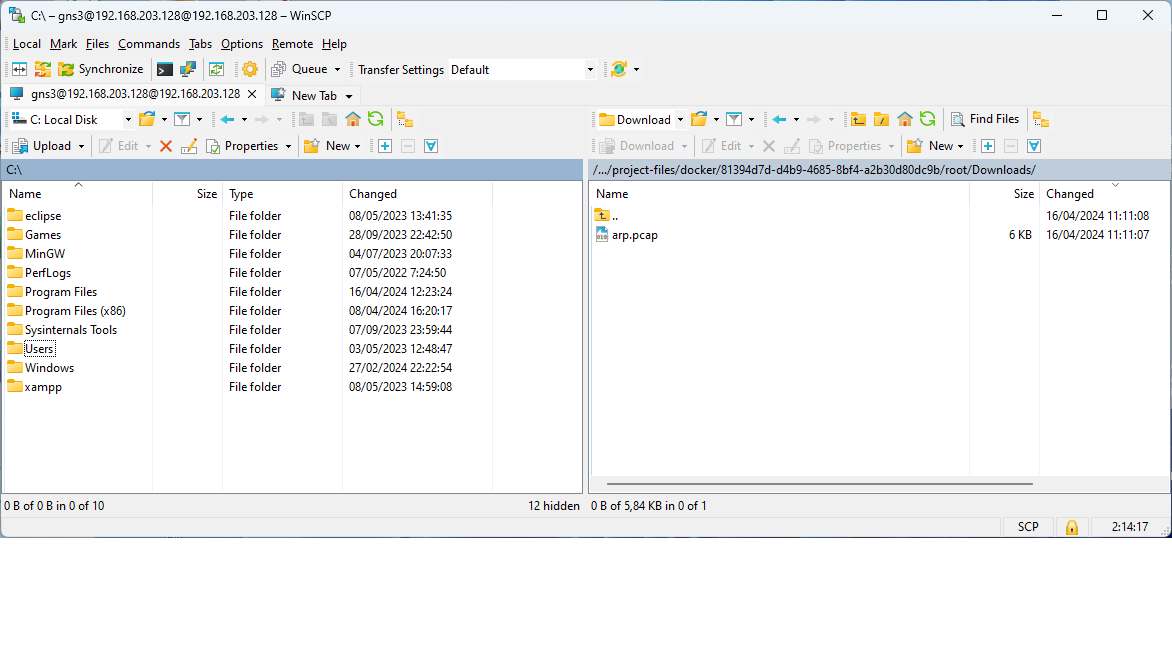
  • Open SCP connection to GNS3 VM
  • User: gns3 Password: gns3 Depending on VM version user might be gns3@xx.xx.xx.xx with xx as IP digits

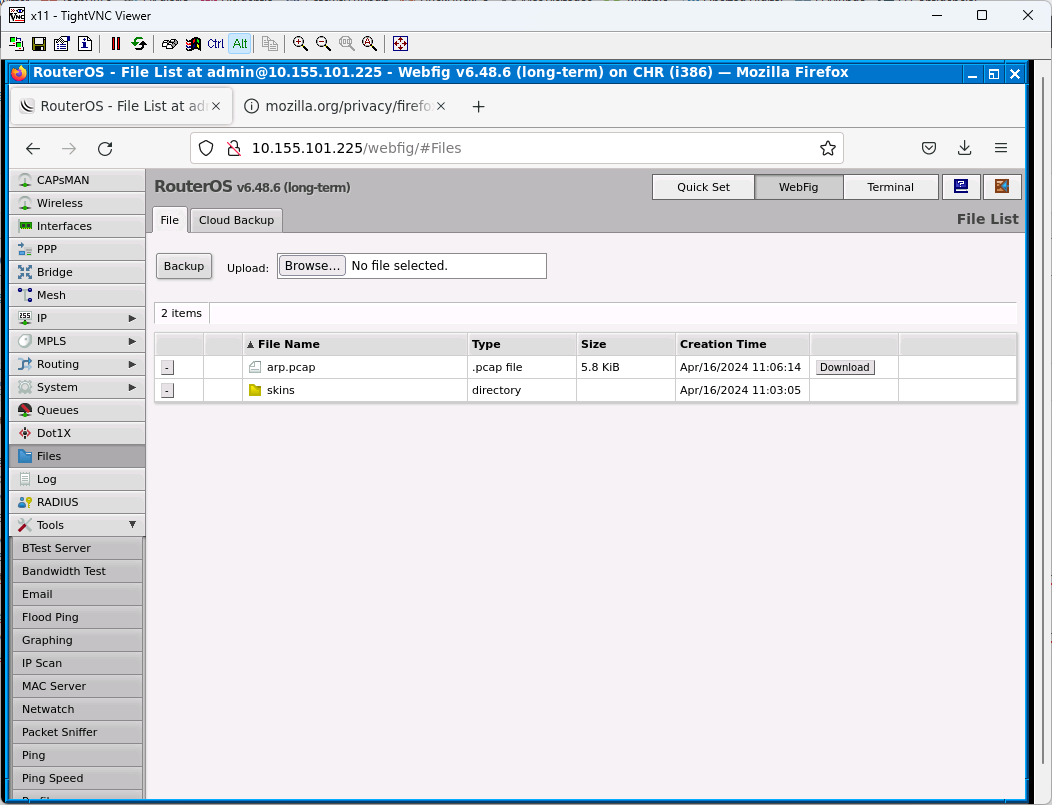
  • Navigate to identify instance of appliance in /root/..
  • It is easy to identify the project files with the date of last modification. In this specific case, we are going to get a downloaded file from a router through Webterm (a docker containing Firefox that can be added to GNS3). You get the id of the instance of the object inside the project hovering over it in GNS3. The file is downloaded in a folder of the docker.

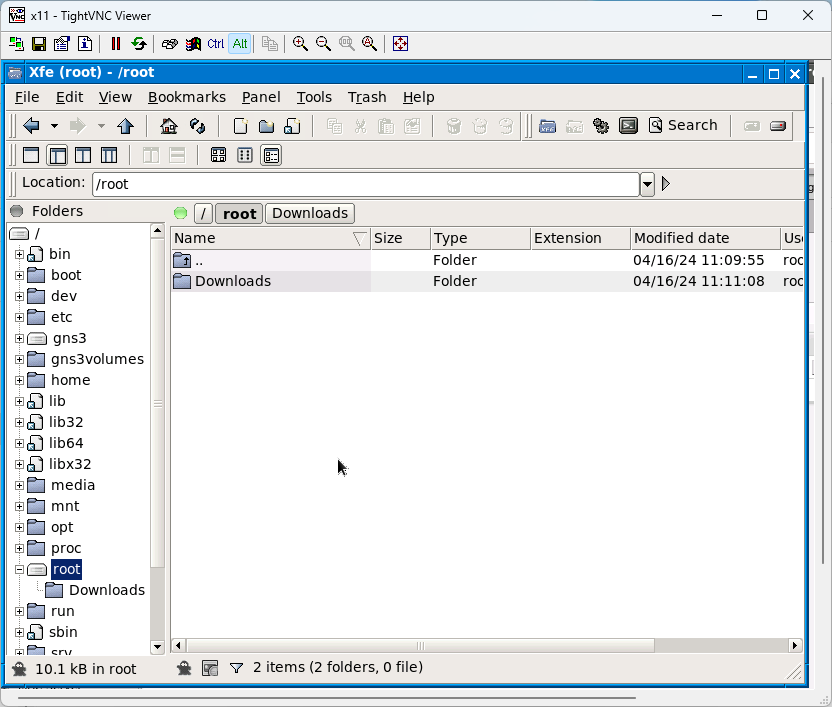
  • Modify permissions
  • Open docker file handler to modify permissions of root folder

QR for fast WiFi access

Download a QR generator program: Download QR Code Studio
Optionally, you can use an online service to generate the QR at your own risk.
Feed this text adapted to your needs:

WIFI:S:My_SSID;T:WPA;P:key goes here;H:false;

Code type
ESSID
encryption type
WPA key
hidden SSID (true/false)

If needed, escape any special characters (“, ‘, ;, ,, or \) with a backslash

Using touch command

Read More

touch Creates a file without content

touch file_name

For multiple files

touch File_name1 File2_name2 File_name3

Running touch on an already existing file: the file’s access and modification timestamps are updated to the current time, the content is not modified

touch -a To modify the access time only

touch -a file_name

touch -am Change access and modification time together

touch -am file_name

touch -c To check if file is created or not

touch -c file_name

-d option Use string with date instead of current time
touch -c -d "2020-03-09 11:33:12.000000000 +0100" file_name
-t option Use timestamp instead of current time. Format [[CC]YY]MMDDhhmm[.ss] touch -c -t 202003091133 file_name

touch -m This is used to change the modification time only
touch -m file_name

touch -r This command is used to copy only the timestamp onto another file

touch -r reference_file_name target_file_name

touch -h For modifying a symbolic link, not the pointed to

touch -h symbolic_link_file

Create several files touch

# Create files with names A to Z
$ touch {A..Z}
# Create files with names 1 to 20
$ touch {1..20}
# Create files with extension
$ touch {1..1000}.txt
# Create 10K files
$ touch {1..10}{1..1000}

Using touch to restore timestamps in a directory tree

To change all the directories to 755 (drwxr-xr-x):

find /opt/lampp/htdocs -type d -exec chmod 755 {} \;

To change all the files to 644 (-rw-r–r–):

find /opt/lampp/htdocs -type f -exec chmod 644 {} \;

And to change file and directories timestamp

find . -exec touch {} \;

Only files

find . -type f -exec touch {} \;

Mount a deviceless webdav connection in Windows 10

Mount deviceless webdav
This type of connection cannot be persistent
net use http://domain/directory/ paasword /USER:user
Access
It is necessary to use MS \\server\resource notation
dir \\domain\directory
Mount with first unallocated unit letter
net use * http://domain/directory/ paasword /USER:user
Mount with specific drive
net use x: http://domain/directory/ paasword /USER:user
Unmount

net use http://domain/directory/ /delete
net use x: /delete

Caution:
net use * /delete
deletes all connections

Net Use Command Options
Option Explanation
net use Execute the net use command alone to show detailed information about currently mapped drives and devices.
devicename Use this option to specify the drive letter or printer port you want to map the network resource to. For a shared folder on the network, specify a drive letter from D: through Z:, and for a shared printer, LPT1: through LPT3:. Use * instead of specifying devicename to automatically assign the next available drive letter, starting with Z: and moving backward, for a mapped drive.
\\computername\sharename This specifies the name of the computer, computername, and the shared resource, sharename, like a shared folder or a shared printer connected to computername. If there are spaces anywhere here, be sure to put the entire path, slashes included, in quotes.
volume Use this option to specify the volume when connecting to a NetWare server.
password This is the password needed to access the shared resource on computername. You can choose to enter the password during the execution of the net use command by typing * instead of the actual password.
/user Use this net command option to specify a username to connect to the resource with. If you don’t use /user, net use will attempt to connect to the network share or printer with your current username.
domainname Specify a different domain than the one you’re on, assuming you’re on one, with this option. Skip domainname if you’re not on a domain or you want net use to use the one you’re already on.
username Use this option with /user to specify the username to use to connect to the shared resource.
dotteddomainname This option specifies the fully qualified domain name where username exists.
/home This net use command option maps the current user’s home directory to either the devicename drive letter or the next available drive letter with *.
/persistent:{yes | no} Use this option to control the persistence of connections created with the net use command. Choose yes to automatically restore created connections at the next login or choose no to limit the life of this connection to this session. You can shorten this switch to /p if you like.
/smartcard This switch tells the net use command to use the credentials present on the available smart card.
/savecred This option stores the password and user information for use next time you connect in this session or in all future sessions when used with /persistent:yes.
/delete This net use command is used to cancel a network connection. Use /delete with devicename to remove a specified connection or with * to remove all mapped drives and devices. This option can be shortened to /d.
/help Use this option, or the shortened /h, to display detailed help information for the net use command. Using this switch is the same as using the net help command with net use: net help use.
/? The standard help switch also works with the net use command but only displays the command syntax, not any detailed information about the command’s options.